

The result you want
Give each client and offer a clear home without creating a new Project for every task.- Keep stable brand and offer context in Products.
- Use Projects for repeatable workflows or campaigns.
- Start one focused Chat for each deliverable.
Practical use cases
Prevent client context from mixing
Keep each client’s stable voice, offer facts and customer context in the
correct Product.
Repeat one process
Use one ad or advertorial Project across offers when its files and short
instructions apply to every execution.
Switch offers without rebuilding
Keep one Product per offer, then mention the relevant Product in each Chat
inside the reusable Project.
Keep a launch together
Create a dedicated Project when a promotion needs its own brief, files,
deadlines and decision history.
Reuse a workflow across clients
Keep client-specific context out of the shared Project. Add the correct
Product and evidence in each focused Chat.
Make handoffs predictable
Change a Project from Personal to Team, then verify the required
Product and Chat access separately.
Use the default hierarchy
Use each layer for one kind of context:Build a reusable client workflow
1
Create one Product per offer
Keep stable brand voice, customer context, approved facts and offer assets
in the relevant Product.
2
Choose the Project boundary
Use a Project for a repeatable workflow or a campaign with shared files and
decisions. Do not create one for every ad or deliverable.
3
Add only reusable Project context
Keep the instructions short. Add only files that every Chat in the Project
should be able to use.
4
Start one focused Chat
Name the deliverable, mention its Product and attach any evidence used only
for this execution.
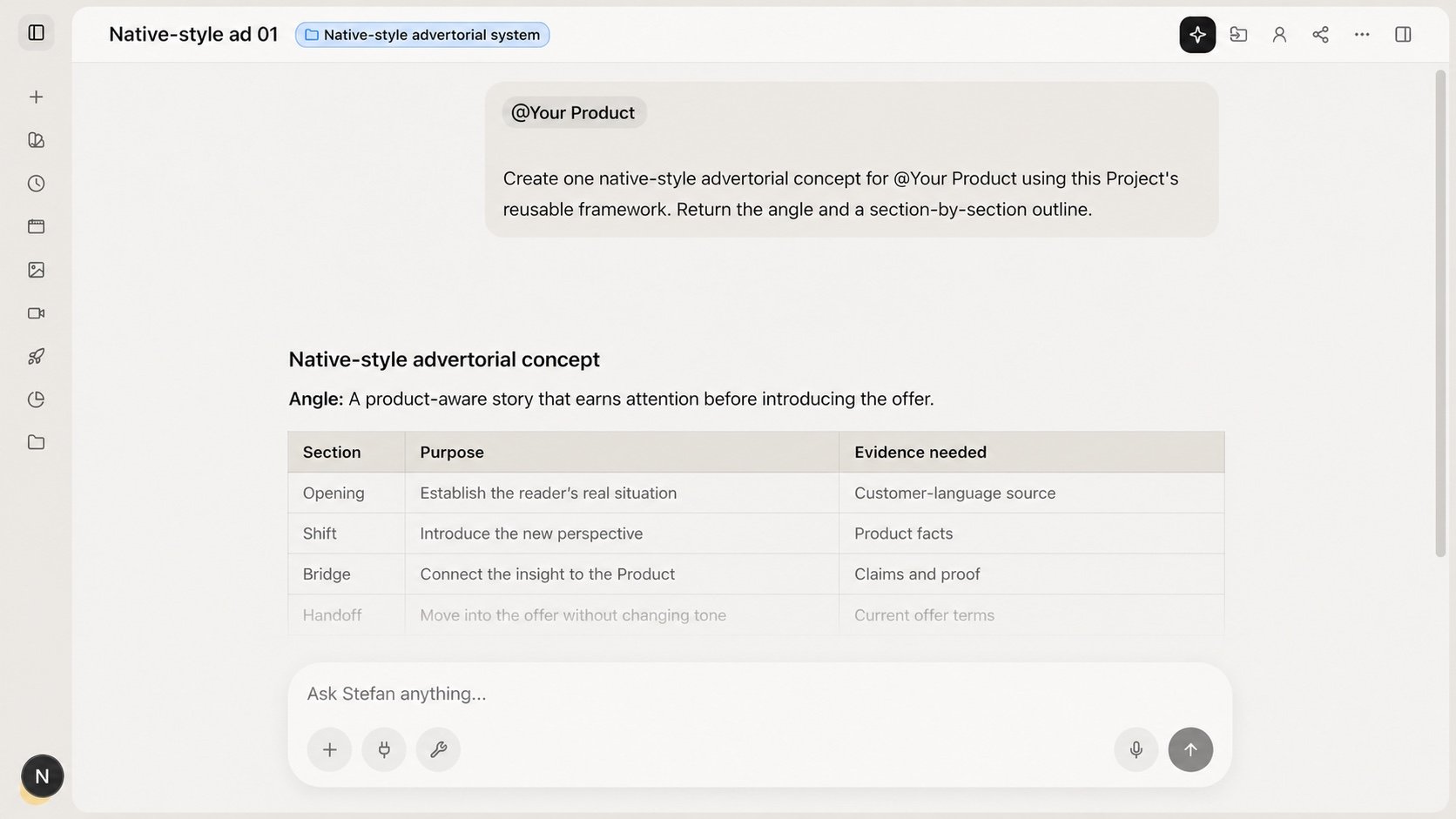
A focused Project Chat adds one Product for the current deliverable.
Ask for the deliverable
Make the Project available to your team
1
Open the Project
Find the person-shaped control in the Project header. It shows Personal
or Team.
2
Change it to Team
Select Personal and confirm the control settles on Team.
3
Share the required Product and Chat
Use the Product row menu and the Chat’s own visibility control. Project
visibility does not cascade.
4
Reverse the change when needed
Select Team to return the Project to Personal visibility.
Common mistakes
- Creating a Project for every deliverable. Reuse the workflow and start a focused Chat.
- Putting stable brand facts in Project instructions. Maintain them in the Product.
- Loading every client file. Keep only the sources each Project should reuse.
- Linking every Product to the Project. Mention the Product needed for the current Chat.
- Assuming Team visibility cascades. Share the required Product and Chat separately.