> ## Documentation Index
> Fetch the complete documentation index at: https://docs.stefanbrain.com/llms.txt
> Use this file to discover all available pages before exploring further.
> ## Agent Instructions
> Follow the content contract in AGENTS.md.
> Treat text as the canonical explanation; video and screenshots enhance it.
> Do not publish unverified product behavior or duplicate an existing canonical article.
# Manage multiple clients with Products and Projects
> Organize client, offer, campaign and deliverable context without creating a separate Project for every task.
## The result you want
Give each client and offer a clear home without creating a new Project for every task.
* Keep stable brand and offer context in Products.
* Use Projects for repeatable workflows or campaigns.
* Start one focused Chat for each deliverable.
## Practical use cases
Keep each client's stable voice, offer facts and customer context in the
correct Product.
Use one ad or advertorial Project across offers when its files and short
instructions apply to every execution.
Keep one Product per offer, then mention the relevant Product in each Chat
inside the reusable Project.
Create a dedicated Project when a promotion needs its own brief, files,
deadlines and decision history.
Keep client-specific context out of the shared Project. Add the correct
Product and evidence in each focused Chat.
Change a Project from **Personal** to **Team**, then verify the required
Product and Chat access separately.
## Use the default hierarchy
Use each layer for one kind of context:
| Layer | Put this here | Do not use it for |
| - | - | - |
| **Product** | Stable client, brand and offer context: facts, customer research, brand voice, source URL and approved assets. | One campaign's temporary brief, deadlines or decisions. |
| **Project** | A workflow or campaign: short instructions, working files, optional Product links and related Chats. | Stable client or offer facts copied across campaigns. |
| **Chat** | One execution, deliverable or decision trail inside the selected context. | Every task for the client in one endless conversation. |
Keep Project instructions short. Use them for constraints that apply to every
Chat, such as `Never use the word "quietly."` Put the actual brief and
evidence in the relevant file or Chat.
More context is not automatically better. Do not add hundreds of pages to a
Project when only a few sources affect the current workflow.
## Build a reusable client workflow
Keep stable brand voice, customer context, approved facts and offer assets
in the relevant Product.
Use a Project for a repeatable workflow or a campaign with shared files and
decisions. Do not create one for every ad or deliverable.
Keep the instructions short. Add only files that every Chat in the Project
should be able to use.
Name the deliverable, mention its Product and attach any evidence used only
for this execution.
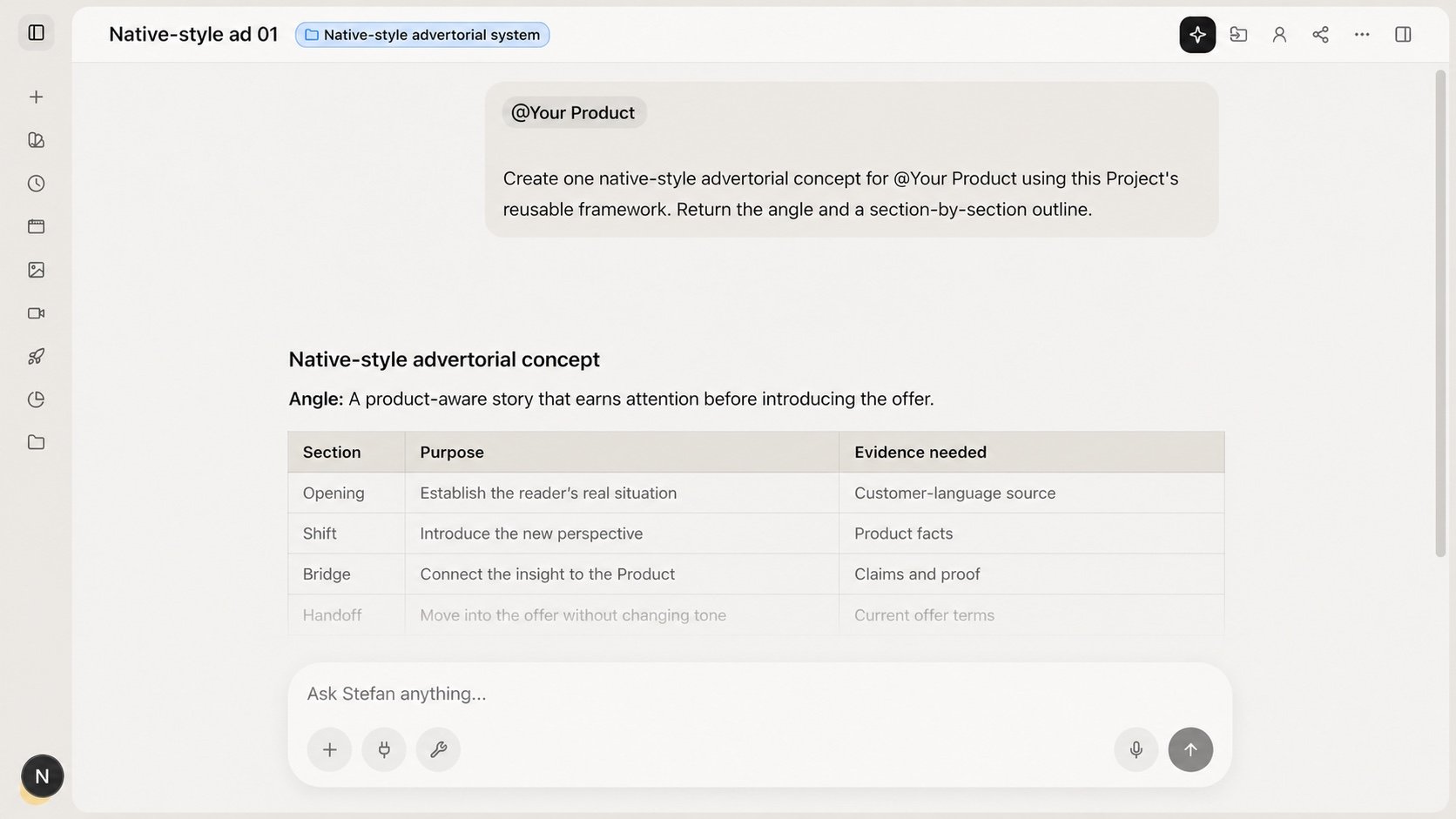 Create another Project when the campaign brief, shared files or decision history changes.
## Ask for the deliverable
```text theme={"system"}
Create a native-style ad concept for @Product using the structure and examples in this Project.
Write it for cold traffic. Return the hook, narrative beats, offer transition, and next production step.
```
If the Product and Project are already selected, do not repeat their full context in the prompt.
## Make the Project available to your team
Find the person-shaped control in the Project header. It shows **Personal**
or **Team**.
Select **Personal** and confirm the control settles on **Team**.
Use the Product row menu and the Chat's own visibility control. Project
visibility does not cascade.
Select **Team** to return the Project to **Personal** visibility.
Project, Product and Chat visibility are separate. Check all three before a
teammate takes over the work.
## Common mistakes
* **Creating a Project for every deliverable.** Reuse the workflow and start a focused Chat.
* **Putting stable brand facts in Project instructions.** Maintain them in the Product.
* **Loading every client file.** Keep only the sources each Project should reuse.
* **Linking every Product to the Project.** Mention the Product needed for the current Chat.
* **Assuming Team visibility cascades.** Share the required Product and Chat separately.
## Related articles
* [Products, projects and chats](/knowledge-base/get-started/products-projects-and-chats)
* [Give Chat the right context](/knowledge-base/chat/give-chat-the-right-context)
* [Share connectors with your team](/knowledge-base/connectors-automations/share-connectors-with-your-team)
This documentation is built and hosted on [Mintlify](https://mintlify.com), a developer documentation platform.
Create another Project when the campaign brief, shared files or decision history changes.
## Ask for the deliverable
```text theme={"system"}
Create a native-style ad concept for @Product using the structure and examples in this Project.
Write it for cold traffic. Return the hook, narrative beats, offer transition, and next production step.
```
If the Product and Project are already selected, do not repeat their full context in the prompt.
## Make the Project available to your team
Find the person-shaped control in the Project header. It shows **Personal**
or **Team**.
Select **Personal** and confirm the control settles on **Team**.
Use the Product row menu and the Chat's own visibility control. Project
visibility does not cascade.
Select **Team** to return the Project to **Personal** visibility.
Project, Product and Chat visibility are separate. Check all three before a
teammate takes over the work.
## Common mistakes
* **Creating a Project for every deliverable.** Reuse the workflow and start a focused Chat.
* **Putting stable brand facts in Project instructions.** Maintain them in the Product.
* **Loading every client file.** Keep only the sources each Project should reuse.
* **Linking every Product to the Project.** Mention the Product needed for the current Chat.
* **Assuming Team visibility cascades.** Share the required Product and Chat separately.
## Related articles
* [Products, projects and chats](/knowledge-base/get-started/products-projects-and-chats)
* [Give Chat the right context](/knowledge-base/chat/give-chat-the-right-context)
* [Share connectors with your team](/knowledge-base/connectors-automations/share-connectors-with-your-team)
This documentation is built and hosted on [Mintlify](https://mintlify.com), a developer documentation platform.