> ## Documentation Index
> Fetch the complete documentation index at: https://docs.stefanbrain.com/llms.txt
> Use this file to discover all available pages before exploring further.
> ## Agent Instructions
> Follow the content contract in AGENTS.md.
> Treat text as the canonical explanation; video and screenshots enhance it.
> Do not publish unverified product behavior or duplicate an existing canonical article.
# Products, projects and chats
> Choose the right StefanBrain context layer so reusable facts, project work and individual conversations stay distinct.
## What this article shows you
Products, Projects and Chats solve different context problems:
* A **Product** holds stable brand and offer context.
* A **Project** keeps related work, files and short shared instructions together.
* A **Chat** handles one focused execution and its follow-ups.
## Practical use cases
Keep a repeatable ad or advertorial process in one Project, then start one
Chat for each execution.
Keep each offer in its own Product and mention the relevant Product in the
Chat that needs it.
Create a dedicated Project when a launch needs its own brief, files and
decision history.
Use a regular Chat for a short task that does not need a lasting workspace.
Make the Project, required Products and required Chats available to the
team as separate visibility decisions.
Keep one execution and its follow-up decisions in the same Chat so the
next person can see what changed and why.
## Use this mental model
| Layer | It owns | Use it when | Example |
| - | - | - | - |
| **Product** | Stable client, brand and offer context: source URL, Description, Facts, Reviews, Images, Creative, Angles and Branding. | The information should remain useful across workflows and campaigns. | One supplement, service, course or offer. |
| **Project** | Related work: short instructions, files, Chats and optional Product links. | Several executions share context, or one campaign needs a lasting workspace. | A native-style advertorial system or a Black Friday launch. |
| **Chat** | One conversation, its messages, attachments, outputs and decision trail. | You need one focused job or a sequence of dependent follow-ups. | Draft and refine three ad concepts for that campaign. |
The layers work together, but they are not interchangeable. A Project can link Products. A Chat can belong to one Project or remain outside Projects.
Keep Project instructions short and global. Add only constraints that should
apply to every Chat in the Project, such as `Never use the word "quietly."`
Use the smallest relevant source set. Do not load hundreds of pages into a
Project because they might be useful later. Add the files that can change the
current result, and keep one-off evidence in its Chat.
## How context reaches a Chat
### Start the Chat inside a Project
Start the Chat inside a Project when it should stay organized with that work. The Project's instructions, linked Products and relevant files are available as context.
### Mention a Product or Project in a regular Chat
Type `@` and choose a Product or Project when a regular Chat needs that context.
Mentioning a Project does not move the Chat into that Project. The Chat keeps its existing Project association, if any.
### Attach evidence to one Chat
Use a Chat attachment for evidence that belongs to one conversation. Say how StefanBrain should use it and which decision it supports.
## A practical pattern
Create one **Native-style advertorial system** Project. Keep its instructions short, and add only reusable examples or checklists.
Start one Chat for each deliverable. Mention the Product for that offer in the Chat, then describe the result you need.
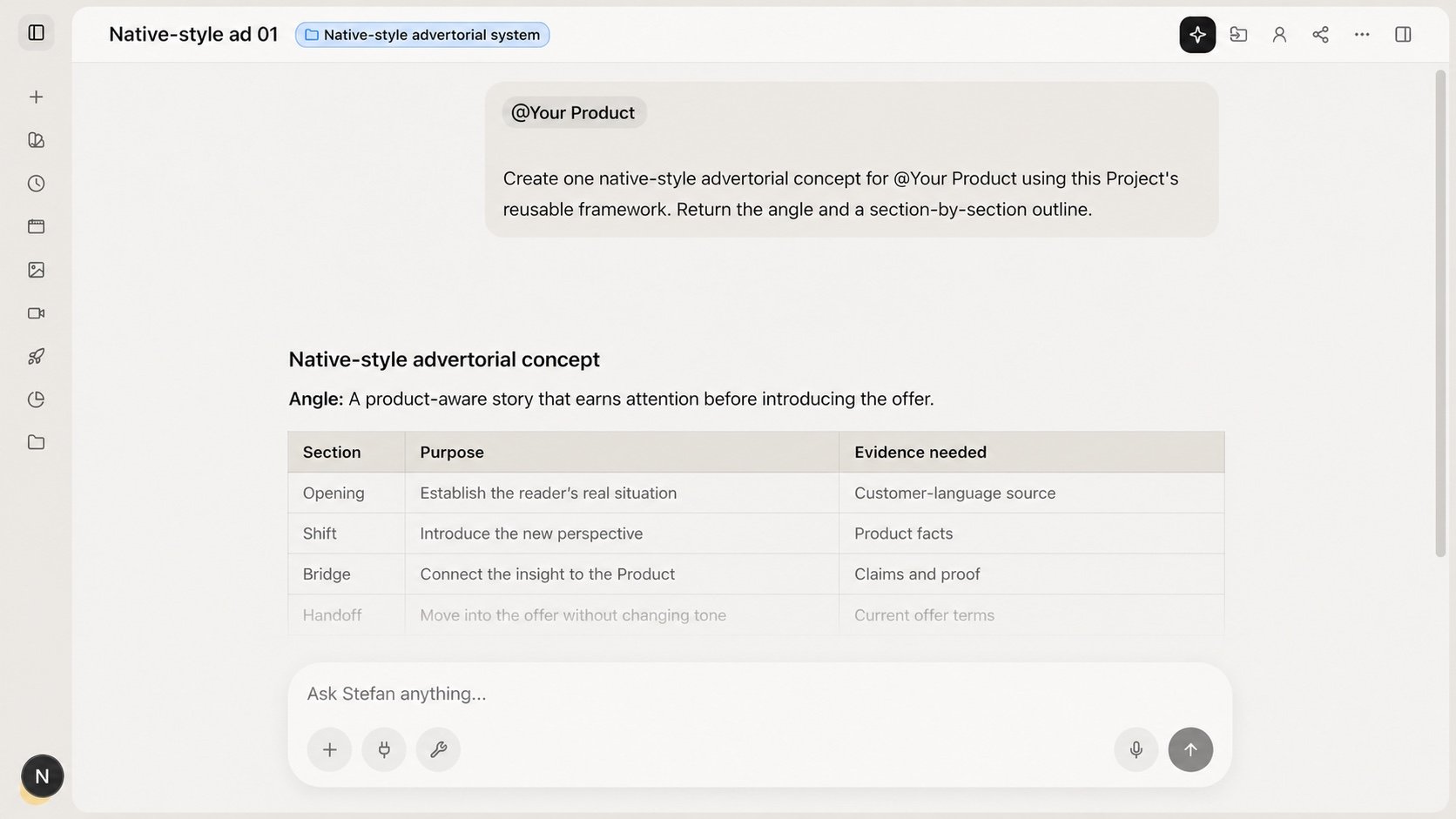 Create another Project when the campaign brief, shared files or decision history changes.
## Share a Project with your team
Find the person-shaped visibility control in the Project header. It shows
**Personal** or **Team**.
Select **Personal** and confirm the control settles on **Team**.
Change each required Product and Chat to **Team** separately. Project
visibility does not cascade to them.
Select **Team** to return the Project to **Personal** visibility.
Project, Product and Chat visibility are separate. Sharing a Project does not
automatically share its linked Products or Chats.
## Common mistakes
* **Putting stable brand facts in Project instructions.** Keep them in the Product.
* **Creating a Project for every execution.** Reuse the Project and start a focused Chat.
* **Loading every available file.** Add only sources relevant to the current workflow.
* **Assuming `@Project` moves a Chat.** Start inside the Project when you want the Chat stored there.
* **Assuming Team visibility shares everything.** Share each required resource separately.
## Related articles
* [Set up your first Product](/knowledge-base/get-started/set-up-your-first-product)
* [Start your first useful Chat](/knowledge-base/get-started/start-your-first-chat)
This documentation is built and hosted on [Mintlify](https://mintlify.com), a developer documentation platform.
Create another Project when the campaign brief, shared files or decision history changes.
## Share a Project with your team
Find the person-shaped visibility control in the Project header. It shows
**Personal** or **Team**.
Select **Personal** and confirm the control settles on **Team**.
Change each required Product and Chat to **Team** separately. Project
visibility does not cascade to them.
Select **Team** to return the Project to **Personal** visibility.
Project, Product and Chat visibility are separate. Sharing a Project does not
automatically share its linked Products or Chats.
## Common mistakes
* **Putting stable brand facts in Project instructions.** Keep them in the Product.
* **Creating a Project for every execution.** Reuse the Project and start a focused Chat.
* **Loading every available file.** Add only sources relevant to the current workflow.
* **Assuming `@Project` moves a Chat.** Start inside the Project when you want the Chat stored there.
* **Assuming Team visibility shares everything.** Share each required resource separately.
## Related articles
* [Set up your first Product](/knowledge-base/get-started/set-up-your-first-product)
* [Start your first useful Chat](/knowledge-base/get-started/start-your-first-chat)
This documentation is built and hosted on [Mintlify](https://mintlify.com), a developer documentation platform.